RPASpy is a plugin that enables viewing HTTPS request and response
headers inside Fiddler v1.x.
NOTE:
Fiddler2 fully supports
HTTPS.
RPASpy is generally no longer needed and will not do anything for IE9 and
later.
In addition to leaking the headers to Fiddler, RPASpy adds a new header
to the Request Headers for each request. The new
X-ProcessAndThread header contains the binary name, the process ID, and
the thread ID.
You can enable and disable RPASpy using shortcuts in your Start Menu.
Note that you must restart all IE instances to see the change.
Download
You can install RPASpy from here (76kb).
Limitations
- RPASpy is test code and
should only be installed on test machines
-
Only HTTPS headers are visible; request and response
bodies are not present
-
Headers are read-only and cannot be changed
-
Only headers from
Internet Explorer (and other WinINET applications) are visible
-
Only headers from the current user on the local computer
are visible
-
If you are using Windows Vista, Protected Mode IE traffic
is not visible.
Other options
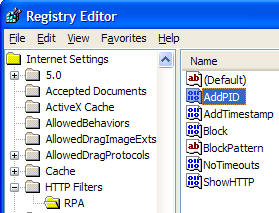
RPASpy 1.3 adds a custom header containing the value of GetTickCount when the
request hits WinINET.
Fiddler can examine this timestamp and compare it to
the current timestamp to see how long the request was blocked.
// Inside OnBeforeRequest, add the following lines
if (oSession.oRequest.headers.Exists("X-Tickcount")){
var iNow = Environment.TickCount;
var iThen = int.Parse(oSession.oRequest["X-Tickcount"]);
oSession["ui-customcolumn"] = "Blocked for: " + (iNow -
iThen).ToString();
}

 Get the NEW book!