 Frequently Asked Questions
NEW
The HowTo guide explains how to accomplish a
variety of tasks with Fiddler.
Q: Why can't I see the HTTPS traffic-- I only see
a "CONNECT" tunnel?
A: HTTPS Traffic
decryption is disabled by default. Learn more about
decrypting HTTPS traffic with
Fiddler2.
Q:
Why don't I see any traffic?
Are you using Trend Micro security software? The Trend Micro Proxy
Service continually rewrites your system proxy settings, which breaks
Fiddler's ability to see your traffic. To use Fiddler, you will need to
disable that feature. In the Windows Services control panel, it's called
Tmproxy, "OfficeScan NT Proxy Service", and the Description is "Scans
network traffic before passing it to the target application."
If you are not using
Trend Micro, keep reading...
Try using your
browser to visit
http://localhost.fiddler:8888/ and determine what you see in the
browser and in Fiddler (remember these facts and share them if you want to
discuss your issue in the forum or using the Help link).
Then, keep reading...
Q: I see some traffic, but some traffic (e.g.
from a specific program) seems to be missing?
Do you have any Traffic Filters enabled? Check in the status bar, the
Process Filter in the toolbar,
and the Filters tab. If you've written or set any Rules (see the menu)
check those too.
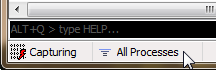
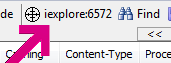
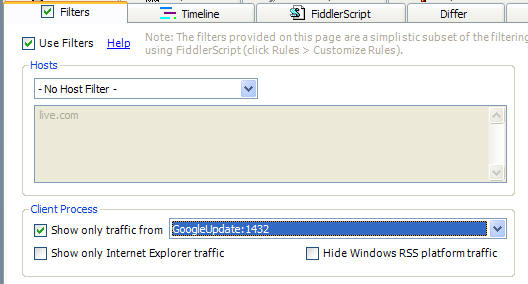
In Fiddler v2.3.6.3 and later, you can click
Troubleshoot Filters... on the Help menu. When you do so,
traffic that would otherwise be hidden is instead shown in a
strikethrough font. The
Comments column will show which of Fiddler's filters
was responsible for attempting to hide the traffic.
Q: Does Fiddler2 support sites that require client
certificates?
A: Yes, Fiddler 2.1.0.3 and later support client certificates. See
Attaching
Client Certificates for more information.
Q: Is Fiddler2 the only tool that debugs
HTTPS traffic?
A: No. There are a number of other free tools which offer this
capability, including the Charles and Burp proxies, written with Java.
Q: The HTTPS protocol was designed to prevent
traffic viewing and tampering. Given that, how can Fiddler2 debug HTTPS
traffic?
A: Fiddler2 relies on a "man-in-the-middle" approach to HTTPS
interception. To your web browser, Fiddler2 claims to be the secure web
server, and to the web server, Fiddler2 mimics the web browser. In order
to pretend to be the web server, Fiddler2 dynamically generates a HTTPS
certificate.
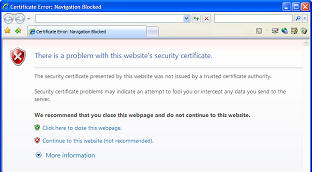
Fiddler's certificate is not trusted by your web browser (since Fiddler is
not a Trusted Root Certification authority), and hence while Fiddler2 is
intercepting your traffic, you'll see a HTTPS error message in your browser,
like so:
Q: Can I reconfigure my Windows client to trust the
Fiddler root certificate, to prevent browser security warning messages and enable logon to services like
LiveID?
A: Yes, see
this page.
Q: Does Fiddler2 demonstrate a flaw in HTTPS?
A: No. HTTPS relies on certificates in order to secure web
traffic. Web browsers prevent man-in-the-middle attacks by relying upon
Trusted Root Certification authorities to issue certificates that secure the
traffic. As designed, web browsers will show a warning when traffic is not
protected by a certificate issued by a trusted root.
Q: Can I change the Text Editor used
by Fiddler to something other than Notepad?
A: Yes.
- Close Fiddler.
- Run RegEdit
- Navigate to HKCU\Software\Microsoft\Fiddler2
- Add a new REG_SZ named TextEditor
- Set the new registry value to the path to your text editor.
A: Yes.
Q: I like to navigate around a site then do a "search" for a text on all the
logged request/responses. I was curious if Fiddler automatically decompressed gzipped responses during search?
A: Fiddler does not decompress during searches by default,
since it would need to keep both the compressed and decompressed body in memory
(for data integrity reasons).
In current versions of Fiddler, you can tick the "Decode Compressed
Content" checkbox on the Find dialog.
Q: The HTTPS protocol was designed to prevent
traffic viewing and tampering. Given that, how can Fiddler2 debug HTTPS
traffic?
A: Please see the topic Decrypting HTTPS
traffic with Fiddler2.
Q: I have another problem.
A: Check the Known Issues or
ask in the community!
< Back to Help Homepage
©2018 Eric Lawrence
| 
 Get the NEW book!
 Get Fiddler!